
Something about a recent update to the Chromium browser on my Linux machine borked one of my user profiles.
No big deal. I’ll just set it back up, right?
Well sure. It took a couple of minutes. But one of my big pet peeves about Google Chrome is this ridiculous idea that the full URL doesn’t need to be displayed.
We could argue the merits of this idea elsewhere (feel free to leave a comment below or reply to me on Twitter if you feel strongly about it), but at least for technologists who build, support, debug, or otherwise work very closely with web properties, WE NEED TO SEE THE WHOLE FREAKING URL, GOOGLE.
Since my user profiles normally keep this setting, I hadn’t needed to solve this problem in a fresh way for quite some time. The old methods involved using chrome://flags (which I definitely used in the past) or even installing an extension (EW!). Many of those solutions persist out there on the web (or even in the Google Chrome help center’s community).
Here It Is: Right-Click in the Address Bar
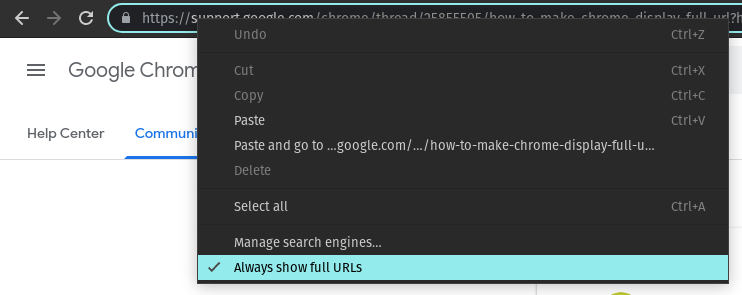
We’re now formally calling it the “omnibox,” but whichever way you refer to it, you want to:
- Right-click in the omnibox (address bar)
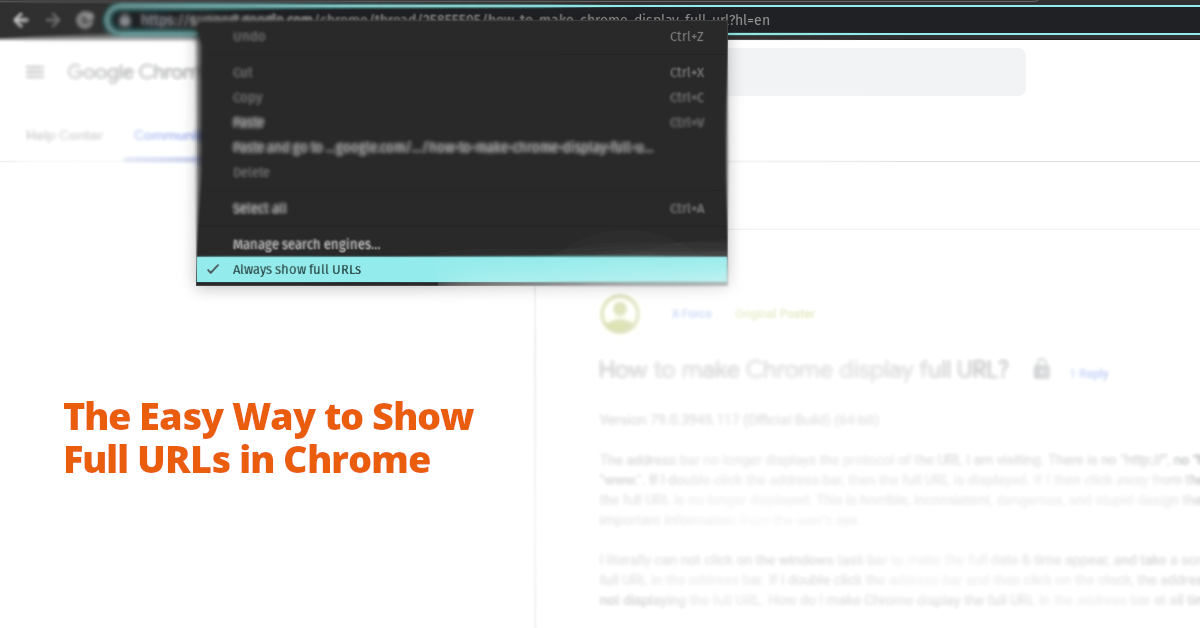
- Choose “Always show full URLs”
I hope this helps!
Your article helped me a lot, is there any more related content? Thanks!
I don’t think the title of your article matches the content lol. Just kidding, mainly because I had some doubts after reading the article.
Your point of view caught my eye and was very interesting. Thanks. I have a question for you.
Your point of view caught my eye and was very interesting. Thanks. I have a question for you.
I have read your article carefully and I agree with you very much. This has provided a great help for my thesis writing, and I will seriously improve it. However, I don’t know much about a certain place. Can you help me?
This is a great article, i am simply a fun, keep up the good work, just finish reading from https://websiteerstellenlassenbamberg.de// and their work is fantastic. i will be checking your content again if you make next update or post. Thank you
Excellent breakdown, I like it, nice article. I completely agree with the challenges you described. For our projects we started using Listandsell.us and experts for our service, Americas top classified growing site, well can i ask zou a question regarding zour article?
Kingphbet! They got a bunch of different stuff to bet on. Sports, casino games… whatever floats your boat. Go check ’em out! kingphbet
Thi is a great article no doubt about it, i just started following you and i enjoy reading this piece. Do you post often ? we have similar post on the german best freelancer platform called https://webdesignfreelancerdeutschland.de/ you can check it out if you want. Thank you
wow your article is simply a masterpiece, i like that, keep it up and will be checking for new update. do you post often? you can check the biggest webdesign freelancer in platform in germany called https://webdesignfreelancerfrankfurt.de/ Thank you for your wonderful post
i really enjoyed your article, keep it like that, google will love it and rank it high, i am now a follower, my site https://topseofreelancerberlin.de/ the best seo freelancer in berlin and germany, check it out
Thanks for sharing. I read many of your blog posts, cool, your blog is very good. https://serenehomecares.com/what-is-lorem-ipsum/?unapproved=1951&moderation-hash=99b454d987c17c545fec5acfa7c4cfad#comment-1951
AI linkbuilding tool with chatgpt
thisis a fantastic article, really nice created, i enjoy reading it, i will be back to check out for latest update, keep up the good work and applause. ng.yandaz.com
I don’t think the title of your article matches the content lol. Just kidding, mainly because I had some doubts after reading the article.
Your point of view caught my eye and was very interesting. Thanks. I have a question for you. https://www.binance.bh/register?ref=IXBIAFVY
The process flow here is clear, but fund management needs more granularity. Check out 777d ???? for deeper operational insights!
This security focus is key; parental oversight matters more than any shiny new game feature. Still, checking out 2jl login slot download seems like a quick way to see how they handle that ‘transparent’ promise for my sanity break!
Really liking the vibe here. Everything loads fast and the bonuses are actually fair compared to other places. Highly recommend br342bet
Honestly, the safety warnings here are spot on. Before diving into any platform like tk6 ?????, understanding local rules is key. It’s not just about what the product description says; caution matters most!
Responsible gaming is key, folks! It’s easy to get caught up in the thrill, but setting limits is vital. Exploring platforms like bossjl vip shows a modern take on classic games, but remember to play smart & within your means!
I really appreciate the fair play and the transparency of this site. It is hard to find such honest platforms these days. Check out 9ajilicom.
If you are a dedicated slot fan you need to test this site out right away. The volatility range covers everything from low risk spins to those thrilling high roller max win moments. I also noticed how quickly they process payout requests even on weekends which makes a huge difference for us. kkkjlslot
[9361]Cod win login at APK download | Legit slots via GCash,Mag-cod win login na para sa legit online slots gcash. Alamin din kung paano maglaro ng baccarat at i-enjoy ang pinakamabilis na withdrawal casino. Sali na! visit: cod win
This is a great reminder that technical transparency is non-negotiable. Whether it’s debugging a browser or ensuring a secure financial transaction, full visibility builds trust. This principle of reliability is key across all digital services, whether you are debugging code or accessing a platform like jilli58 slot download.
Finally found a platform that doesn’t lag during peak hours. The registration process was a breeze. Great job guys at phjljl1.
Your point of view caught my eye and was very interesting. Thanks. I have a question for you.